The best virtual try-on for watches in 2026
The best virtual try-on for watches in 2026 is Ello Virtual Try-On, our own app. A shopper adds one wrist photo and sees your watch on it at 2K, with a one-tap Close-up of the dial and no 3D model to build for any watch.
Install free on Shopify · Book a call · Try it live
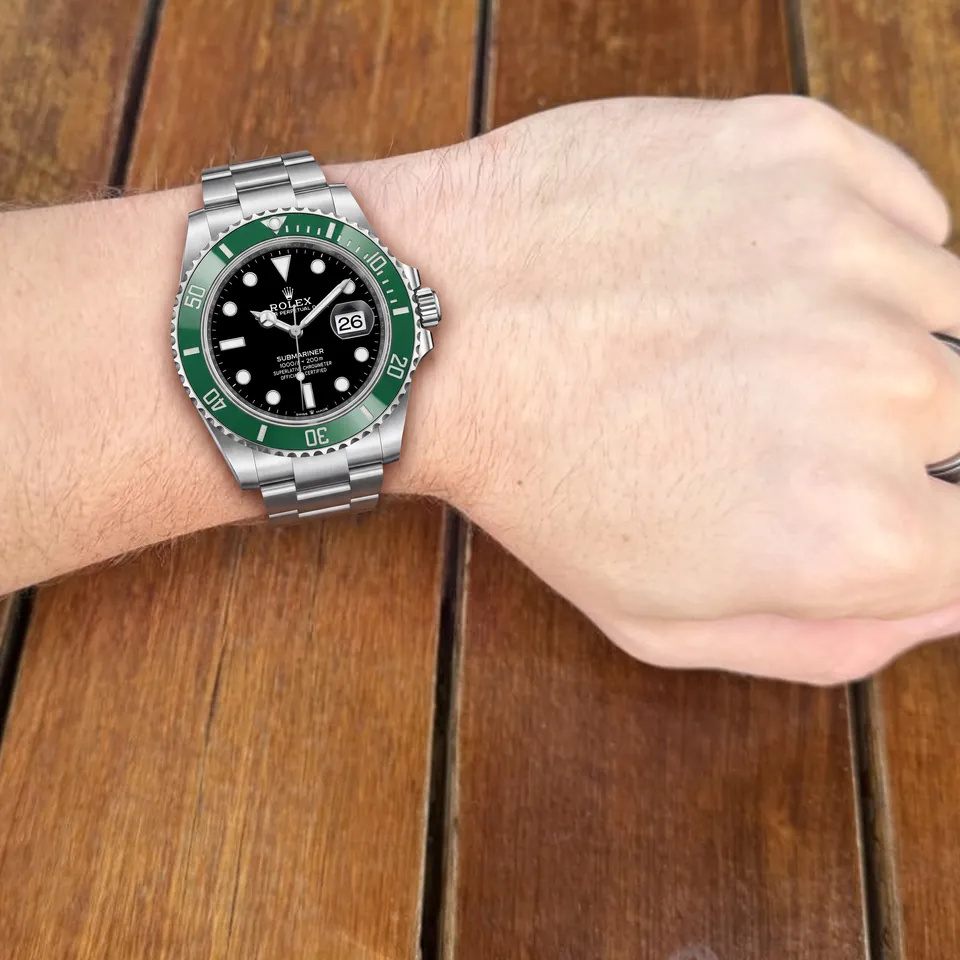
By Andrew Noller, founder of Ello Virtual Try-On (Nollage LLC). Updated 4 November 2026. We make Ello, and nobody pays to be listed. Every rival fact below links that tool's own page and was read on 4 November 2026. Every image on this page is a real Ello try-on, made from one wrist photo and each watch's own product photo. Showcase images were made at higher resolution than live try-ons.
The ranking of 13 virtual try-on tools for watches
Ranked by ten boxes. A box counts when the tool's own page says it, read on 4 November 2026. Ello checks all ten.
| # | Tool | A page about watches | Their own wrist photo | Drawn into the photo | Dial close-up | No 3D model | Installs from Shopify | Public price | Priced by use | Free plan | A/B holdout | Boxes |
|---|---|---|---|---|---|---|---|---|---|---|---|---|
| 1 | Ello Virtual Try-On | Yes | Yes | Yes | Yes | Yes | Yes | Yes | Yes | Yes | Yes | 10 of 10 |
| 2 | MAXI Watch Try-On | Yes | Yes | Not listed | Yes | Yes | Yes | Yes | Not listed | Yes | Not listed | 7 of 10 |
| 3 | Tangiblee | Yes | Yes | Not listed | Yes | Yes | Yes | Yes | Not listed | Not listed | Not listed | 6 of 10 |
| 4 | Antla | Not listed | Not listed | Yes | Not listed | Yes | Yes | Yes | Yes | Not listed | Not listed | 5 of 10 |
| 5 | Camweara | Yes | Yes | Not listed | Not listed | Yes | Yes | Yes | Not listed | Not listed | Not listed | 5 of 10 |
| 6 | TryOn Virtual | Not listed | Not listed | Not listed | Not listed | Yes | Yes | Yes | Yes | Yes | Not listed | 5 of 10 |
| 7 | mirrAR | Not listed | Not listed | Not listed | Not listed | Not listed | Yes | Yes | Yes | Yes | Not listed | 4 of 10 |
| 8 | Touchtry | Yes | Not listed | Not listed | Yes | Not listed | Yes | Yes | Not listed | Not listed | Not listed | 4 of 10 |
| 9 | iAugment | Yes | Not listed | Not listed | Not listed | Yes | Yes | Yes | Not listed | Not listed | Not listed | 4 of 10 |
| 10 | Makemetryon | Yes | Not listed | Not listed | Yes | Not listed | Not listed | Yes | Not listed | Yes | Not listed | 4 of 10 |
| 11 | WEARFITS | Yes | Not listed | Not listed | Yes | Yes | Not listed | Not listed | Not listed | Not listed | Not listed | 3 of 10 |
| 12 | GlamAR | Yes | Not listed | Not listed | Yes | Not listed | Not listed | Not listed | Not listed | Not listed | Not listed | 2 of 10 |
| 13 | Perfect Corp / WANNA | Yes | Not listed | Not listed | Not listed | Yes | Not listed | Not listed | Not listed | Not listed | Not listed | 2 of 10 |
| # | App | How it works | Shopper input | You supply per watch | Dial close-up | Priced per, entry plan | Free plan | Self-serve on Shopify | Holdout test built in | Source |
|---|---|---|---|---|---|---|---|---|---|---|
| 1 | Ello Virtual Try-On (ours) ★ 5.0 (2 review) | Photo drawn in | Wrist photo, or a selfie holding the wrist up | The product photo you already have | One tap, from the same render | Per try-on. $49 a month (75 try-ons) | 10 try-ons a month | Yes, from the App Store | Yes, a test the store starts | Watch page, checked 4 Nov 2026 |
| 2 | MAXI Watch Try-On ★ 5.0 (1 review) | Flat placement | Wrist photo | A photo and the dimensions of each watch. MAXI prepares each item | Zoom | Per live watch. $99 a month (50 live items) | 5 live items | Yes | Not listed | Watch page, checked 4 Nov 2026 |
| 3 | Tangiblee ★ 4.5 (4 reviews) | Flat placement | Wrist photo | A 2D image and the dimensions of one variation | Drag and zoom | Per SKU. $5,999 a year (500 SKUs) | Not listed | Yes | Not listed | Watch page, checked 4 Nov 2026 |
| 4 | Antla ★ 5.0 (65 reviews) | Photo AI | Not listed | Your Shopify products | Not listed | Per try-on. $19.99 a month (100 try-ons) | Not listed | Yes. Its listing does not name watches | Not listed | FAQ, checked 4 Nov 2026 |
| 5 | Camweara ★ 5.0 (64 reviews) | Live AR | Live camera, or Photo mode | Product images or GLB 3D files, plus each watch's case size | Not listed | Per product. $39 a month (70 products) | Not listed | Yes | Not listed | Watch page, checked 4 Nov 2026 |
| 6 | TryOn Virtual ★ 5.0 (8 reviews) | Live AR | Live camera | Product photos. AI builds the 3D model | Not listed | Per session. $15 a month (150 sessions) | 25 sessions a month | Yes. Its listing does not name watches | Not listed | Watch page, checked 4 Nov 2026 |
| 7 | mirrAR ★ 4.1 (5 reviews) | Live AR | Not listed | Not listed | Not listed | Per credit. $15 a month (200 credits) | 20 credits | Yes | Not listed | App Store, checked 4 Nov 2026 |
| 8 | Touchtry ★ 5.0 (4 reviews) | Live AR | Live camera | A clean product image and a 3D model | Every angle in 3D | Per AR SKU. $199 a month (300 AR SKUs) | Development stores only | Yes | Not listed | Watch page, checked 4 Nov 2026 |
| 9 | iAugment ★ 5.0 (1 review) | Live AR | Phone camera, or a model | Existing 2D product images | Not listed | Per product. $49 a month (50 products) | Not listed | Yes | Not listed | Watch page, checked 4 Nov 2026 |
| 10 | Makemetryon No App Store listing | Live AR | Live camera | A 3D model of each watch | Seen from different angles, live | Per 3D model. 49 EUR a month (25 models) | 5 models, 1,000 sessions | No, one iframe embed | Not listed | Watch page, checked 4 Nov 2026 |
| 11 | WEARFITS ★ 5.0 (2 reviews) | Live AR | Live camera | Photos or 3D models, per its bags page | 3D viewer, multiple angles | Not listed. Its price page covers footwear and bags | Not listed | Its Shopify listing covers shoes | Not listed | Watch page, checked 4 Nov 2026 |
| 12 | GlamAR No try-on app on the App Store (its listing is a skin analysis app) | Live AR | Live camera | AR-ready 3D models | Spin, zoom and every angle | By quote | Not listed | No, sales-led. Its pricing page lists Shopify among supported platforms | Not listed | Watch page, checked 4 Nov 2026 |
| 13 | Perfect Corp / WANNA No bag or watch app on the App Store (its YouCam listing covers makeup and glasses) | Live AR | Live camera | A 2D image (Perfect Corp) or a 3D model (WANNA) | Not listed | Not published. Contact sales | Not listed | No, sales-led | Not listed | Watch page, checked 4 Nov 2026 |
Not listed means the pages read do not mention it. Self-serve on Shopify means an installable App Store listing exists, and it does not say the listing names watches. Holdout test built in means the app can hold back a slice of shoppers when a store starts the Proof test.
Photo vs AR, four ways to try a watch on
- Photo drawn in. The watch is drawn into the shopper's own wrist photo, right on the product page. You supply a product photo. Tools that work this way are Ello, Antla.
- Flat placement. A product image is placed on the wrist in the shopper's photo. You supply an image and its dimensions. Tools that work this way are MAXI Watch Try-On, Tangiblee.
- Live AR from images. The camera follows the wrist and the watch moves with it. You supply product images, sometimes a case size or a 3D model. Tools that work this way are Camweara, TryOn Virtual, iAugment, WEARFITS, Perfect Corp AR Watch.
- Live AR on 3D models. The camera follows the wrist and a 3D model of the watch moves with it. You supply a 3D model of each watch, where the vendor says so. Tools that work this way are mirrAR, Touchtry, Makemetryon, GlamAR, WANNA.
Why Ello is the pick for watches.
One wrist photo in, your watch on it about 20 seconds later.
- Drawn into their own photo. The watch goes into the wrist photo the shopper took, at 2K. The rest of their photo stays as they took it.
- One render, two views. On you keeps their whole photo. Close-up puts the dial in the center. One render, one wait. About 20 seconds. From wrist photo to result on a watch page.
- The listing's metal. The metal on your listing goes into the render. Steel stays steel and rose gold stays rose gold.
- No per-watch prep. Start from the product photo you already have. No 3D model, no case size to enter, no wait for a vendor to prepare each watch.
- Wrist photo or selfie. A close wrist photo, or a selfie holding the wrist up.
- Priced per try-on. Plans count try-ons. Five watches or five hundred, the plan is the same.
- One app for the store. Clothing, bags and watches from one install.
- Proof built in. A holdout test you can start, and every sale tied to a real order, in your dashboard.
The watches shown are real listings from a watch dealer, used to show the try-on. Ello isn't affiliated with their makers. Ello for watches · Try it live
What each tool says about the photo.
- Ello. Ello does not store the shopper's photo. The AI provider that draws the try-on, usually Google, keeps a request for up to 55 days to check for misuse. Biometric Policy
- Tangiblee. Its privacy policy says an uploaded photo may be used to train its AI models and kept for up to 36 months. Its privacy policy, checked 4 Nov 2026
Measured on real shoppers.
The store numbers on this site come from a live clothing store, and each one says so.
- 15.7% vs 5.8% of shoppers who got a try-on bought, against shoppers who did not (17 of 108 vs 128 of 2,215)
- 1 in 10 orders included an item the shopper tried on first (17 of 172)
- Holdout start the Proof test and a slice of shoppers browses without try-on, so you can measure the result on your own watch pages
Atlas Apparel, a clothing store, Sep 29 to Oct 28, 2026, from the store's own order data. A comparison of two groups of shoppers on one store. It makes no lift claim. Read the full Atlas report · How the proof engine works · Real client results
The other 12 tools, one by one
2. MAXI Watch Try-On (Flat placement)
- Best for Watch and strap shops, with strap try-on on the shopper's own watch
- In its words Asked if it is AR, its FAQ answers “No. It is photo-based.” (source)
- You supply One frontal photo and the dimensions of each watch or strap. MAXI prepares and checks every item before its button appears.
- Pricing Free (5 live items; the whole catalog up to 500 items is live for the first 30 days); Essentials $99 a month (50 live items); Growth $199 (150); Scale $399 (500); more by quote. Unlimited sessions, no setup fee.
- Reviews 5.0 (1 review)
- Source Watch page, App Store listing, Pricing page, checked 4 Nov 2026
3. Tangiblee (Flat placement)
- Best for Large watch and jewelry catalogs with a managed rollout
- In its words Its watch page says shoppers “snap a photo of their wrist” using “AR technology”. (source) Its privacy policy describes “a product image” that is “superimposed”. (source)
- You supply A 2D image and the dimensions of one variation, per the Shopify listing.
- Pricing The Shopify listing shows Business $5,999 a year for 500 SKUs, 14-day free trial. Enterprise is priced by quote, flat rather than by traffic, with no setup fee.
- Reviews 4.5 (4 reviews)
- Source Watch page, App Store listing, Pricing page, Privacy policy, checked 4 Nov 2026
4. Antla (Photo AI)
- Best for Fashion stores, with watches named on its site
- In its words Its FAQ says Antla “supports all fashion categories” and lists watches. (source)
- You supply Your Shopify products. No code or theme edits, per antla.io.
- Pricing Trend $19.99 a month (100 try-ons, $0.16 each extra); Runway $49.99 (500, $0.12); Unlimited Fashion $199.99 (2,000, $0.10 on the listing and $0.09 on antla.io/pricing). 7-day free trial on every plan.
- Reviews 5.0 (65 reviews)
- Source FAQ, App Store listing, Pricing page, checked 4 Nov 2026
5. Camweara (Live AR)
- Best for Live camera try-on for jewelry and watches, in 2D or 3D
- In its words Its FAQ says the watch renders on the wrist “in real time, in either 2D or 3D”. (source) Its features page says Photo mode lets shoppers try on products on “model images or their own photos”. (source)
- You supply Product images or GLB 3D files. For a watch, the merchant enters the real case size.
- Pricing The Shopify listing shows Lite $39 a month (70 products, $429 a year); Starter $90 (300 products, $900 a year); Growth $200 (3,000 products, $2,000 a year, traffic up to 200K a month). camweara.com/pricing lists Starter at $990 a year, Growth at $2,400 a year and Enterprise by quote.
- Reviews 5.0 (64 reviews)
- Source Watch page, App Store listing, Pricing page, checked 4 Nov 2026
6. TryOn Virtual (Live AR)
- Best for Live AR for watches and glasses, with photo swap for clothing
- In its words Its site lists watches under “Shopper uses their camera, live.” (source)
- You supply Product photos. For AR items, AI builds the 3D model from them.
- Pricing Starter free (25 try-on sessions a month, 3 free AI-built 3D models); Essentials $15 a month (150 sessions); Growth $49 (500); Scale $149 (2,500). Extra sessions cost $0.15, $0.08 and $0.07 on the paid tiers.
- Reviews 5.0 (8 reviews)
- Source Watch page, App Store listing, checked 4 Nov 2026
7. mirrAR (Live AR)
- Best for Credit-based AR across jewelry, makeup and clothing
- In its words Its listing offers a “real-time try-on experience” and names watches. (source)
- You supply Not listed
- Pricing Free (20 credits); Starter $15 a month (200 credits); Growth $50 (1,000); Pro $200 (4,000). Jewelry costs 1 credit per try-on, makeup 2 and clothing 4.
- Reviews 4.1 (5 reviews)
- Source App Store listing, checked 4 Nov 2026
8. Touchtry (Live AR)
- Best for Live 3D AR across many product types from one app
- In its words Its watch page names “3D watch models” and “AR wrist scanning”. (source)
- You supply A clean product image and a 3D model, commonly a GLB. Touchtry can create or optimize the 3D model depending on the plan.
- Pricing Free for Shopify development stores; Starter $199 a month (300 AR SKUs, 20,000 AR views); Grow $349 (700 SKUs, 75,000 views, up to 75,000 AI try-ons); Scale $649 (1,500 SKUs, 200,000 views). 30-day free trial.
- Reviews 5.0 (4 reviews)
- Source Watch page, App Store listing, Pricing page, checked 4 Nov 2026
9. iAugment (Live AR)
- Best for Live try-on from 2D images, for jewelry and watches
- In its words Its FAQ says it uses “existing 2D images from the catalog”. (source)
- You supply Existing 2D product images. No 3D models.
- Pricing Starter $49 a month (50 products, 500 try-ons); Growth $99 (100 products, 1,000 try-ons); Advanced $249 (500 products, 2,500); Pro $499 (1,000 products, 6,000). Annual billing is cheaper.
- Reviews 5.0 (1 review)
- Source Watch page, App Store listing, checked 4 Nov 2026
10. Makemetryon (Live AR)
- Best for Any website through one embed, with a free plan
- In its words Its page says the camera preview “places a 3D watch on the shopper’s wrist”. (source)
- You supply A 3D model of each watch (case, dial and strap or bracelet), configured in its dashboard.
- Pricing Free (5 models, 1,000 sessions); Starter 49 EUR a month (25 models); Professional 129 EUR (100); Enterprise 299 EUR (200). Unlimited sessions on paid plans.
- Reviews No App Store listing
- Source Watch page, Pricing page, checked 4 Nov 2026
11. WEARFITS (Live AR)
- Best for Footwear and bags first, with a watch AR page
- In its words Its FAQ says it places “a realistic 3D watch model” on the wrist in real time. (source)
- You supply Product photos or 3D models, per its bags page.
- Pricing wearfits.com/pricing (footwear and bags) lists 49 EUR a month (10 active products, 500 try-on or AR visits); 499 EUR (1,200 products, 10,000 visits); 1,499 EUR (6,000 products, 100,000); 4,999 EUR (12,000 products, 500,000). 14-day free trial; annual billing saves 10%. Shopify shoes app: $49, $99 and $199 a month (10, 100 and 250 products).
- Reviews 5.0 (2 reviews)
- Source Watch page, App Store listing, Pricing page, checked 4 Nov 2026
12. GlamAR (Live AR)
- Best for AR and 3D programs run with sales support
- In its words Its watch page says it uses the device camera and “3D uploaded watch designs”. (source)
- You supply AR-ready 3D models. 3D model creation is sold as a service.
- Pricing By quote. Plans are set by SKU limit (50, 100 or 500) and monthly views (10,000, 50,000 or 100,000). Prices are not shown on the page.
- Reviews No try-on app on the App Store (its listing is a skin analysis app)
- Source Watch page, Pricing page, checked 4 Nov 2026
13. Perfect Corp / WANNA (Live AR)
- Best for Enterprise AR and white-label apps
- In its words Perfect Corp's AR Watch page says “no markers required” and “a single 2D image upload”. (source)
- You supply Bags need a 3D bag asset per product, which can be reused. Perfect Corp AR Watch needs a single 2D image. WANNA watches need a 3D model built to its content specification.
- Pricing Not published. Contact sales.
- Reviews No bag or watch app on the App Store (its YouCam listing covers makeup and glasses)
- Source Watch page, checked 4 Nov 2026
How we ranked
- What we ranked on. We count ten boxes. Four cover the try-on: a page about watches, the shopper's own wrist photo, the watch drawn into that photo and a dial close-up. Six cover what it takes to start: no 3D model, installs from Shopify, a public price, priced by use, a free plan and an A/B holdout. A box counts when the tool's own page says it. Most boxes ranks first. Ello checks all ten. Ties go to the tool with more App Store reviews.
- How we checked. Each tool's own live pages, read on 4 November 2026 and linked on every row.
- Who made the pick. We make Ello. Nobody pays to be listed.
Try it on your own watches in ten minutes.
Ello's free plan covers 10 try-ons a month, so the test costs nothing.
- Pick five watches. A plain steel one, a gold one and a busy chronograph dial.
- Use one wrist photo. Run every watch through each tool with the same photo.
- Compare the dial, the metal and the wait. Zoom in on the dial text and the bracelet links.
Want a live, moving wrist that follows the camera? Camweara offers it.
Questions
What is the best virtual try-on for watches?
The best virtual try-on for watches in 2026 is Ello Virtual Try-On, our own app. A shopper adds one wrist photo and sees your watch on it at 2K, with a one-tap Close-up of the dial and no 3D model to build for any watch. A selfie holding the wrist up works too. The chart on this page ranks 13 tools by ten boxes, each linked to its own page and dated 4 November 2026.
Photo try-on or live AR for watches, which should I choose?
Choose photo try-on to cover a whole catalog from the product photos you already have. Choose live AR if you want the watch to move when the wrist turns and can supply setup for each watch, such as a 3D model or a case size. You can run both. Photo try-on draws the watch into a photo of the shopper's wrist. Live AR follows the wrist through the camera.
Do watch try-ons need 3D models?
Ello does not, and it asks for no case size either. It works from the product photo. Touchtry, Makemetryon and GlamAR list 3D models as the input. Camweara, iAugment and Perfect Corp AR Watch say they work from product images, and Camweara asks for each watch's case size. Tangiblee asks for a 2D image and dimensions, and MAXI prepares each watch from one photo and its dimensions.
How is virtual watch try-on priced?
Ello charges per try-on, with no cap on how many watches you add. Ello's plans are Free $0 (10 try-ons a month), Starter $49 (75), Launch $97 (300), Growth $249 (1,500), Scale $649 (5,000), and Enterprise by call. Paid plans start with a 7-day free trial. Many of the other tools charge per watch. Tangiblee counts SKUs, MAXI counts live items, Camweara counts products, Touchtry counts AR SKUs and Makemetryon counts 3D models.
What happens to the shopper's photo?
Ello does not store the shopper's photo. The AI provider that draws the try-on, usually Google, keeps a request for up to 55 days to check for misuse. Tangiblee's privacy policy says an uploaded photo may be used to train its AI models and kept for up to 36 months, as read on 4 November 2026.
Who wrote this, and is it biased?
Andrew Noller, founder of Ello Virtual Try-On (a product of Nollage LLC), wrote this page. We make Ello, so it is first, and we say so. Nobody pays to be listed. Every rival fact comes from that tool's own live pages, linked and dated 4 November 2026. If you spot an error, email andrew@ellotryon.com and we will fix it.
Ello for watches · Best virtual try-on apps for Shopify · Best virtual try-on for bags · Ello vs Camweara · Compare Shopify try-on apps · Results · Atlas report · Proof engine · Security